Understanding Event Dispatching Thread in Java

Posted on Sat 24 August 2019 in Java • Tagged with Java

Swing provides a rich toolkit of GUI components which can be used to create powerful User Interface. Sometimes, we don’t get expected results when we are working on complex GUI & try to update GUI of that running application. From running application we mean that we have a Swing application …


Continue reading
Android Activity LifeCycle

Posted on Fri 18 July 2014 in J4A (Java for Android) • Tagged with Activity, Android, Lifecycle

Activity is the base class of an Android Activity (package android.app). An Activity represents a view to the user. For eg. When we open Messaging app to write a new message, it is an Activity. After writing the message, when we open contacts to select the person, it can …


Continue reading

Android Activity lifecycle (Code) & Debugging using LogCat (Android Part – 8)

Posted on Thu 17 July 2014 in J4A (Java for Android) • Tagged with Android, Debugging, Lifecycle

Hello Geeks, hope you have read the previous article and are clear with the theoretical concepts of an Android Activity and its Lifecycle. Now we will create a code for the same to see what all methods are called in which cases. This code is similar to what you might …


Continue reading

Resetting Windows Password

Posted on Thu 17 July 2014 in How To DIY • Tagged with Password, Recovery, Reset, Windows

In past, some of you have used clever utilities like Kon Boot Utility to reset your window password, or asked your engineer to format C:/ drive if there was no way out. This article will introduce various ways to reset password in Windows xp,vista, 7,8 & 8.1. Please …


Continue reading

Creating your first Java Program (J4A - 2)

Posted on Sat 22 February 2014 in J4A (Java for Android), Programming • Tagged with Android, Java

Beginning Java Programming

Some institutes/tutorials start java directly using Netbeans or Eclipse IDE. But this is not the correct way. A better method is to use a basic text editor like Notepad2 or Notepad++ to begin Java. IDE’s provide shortcuts which experienced programmers use. If beginners opt for …


Continue reading

Moving from C++ to Java (J4A - 1)

Posted on Sat 22 February 2014 in J4A (Java for Android), Programming • Tagged with Android, Java

C to C++ and C++ to Java:

C was a powerful programming language but used structural approach. So when the length of code exceeded a particular no. of lines, the code became unmanageable. So this led to Object Oriented Programming techniques and birth of C++. But C++ compilers at that …


Continue reading

Introduction and Syllabus (J4A - 0)

Posted on Sat 22 February 2014 in J4A (Java for Android) • Tagged with Android, Java

Hello geeks, (J4A) Java for Android is a series of tutorials for those who have good knowledge of C++ and want to switch to android without going into details of Core Java. So here we'll discuss ONLY THOSE features of JAVA (keywords, classes, concepts) which are used in android also …


Continue reading

Second simple Android Application Part 3 (Android-Part 6)

Posted on Fri 14 February 2014 in Android • Tagged with Android

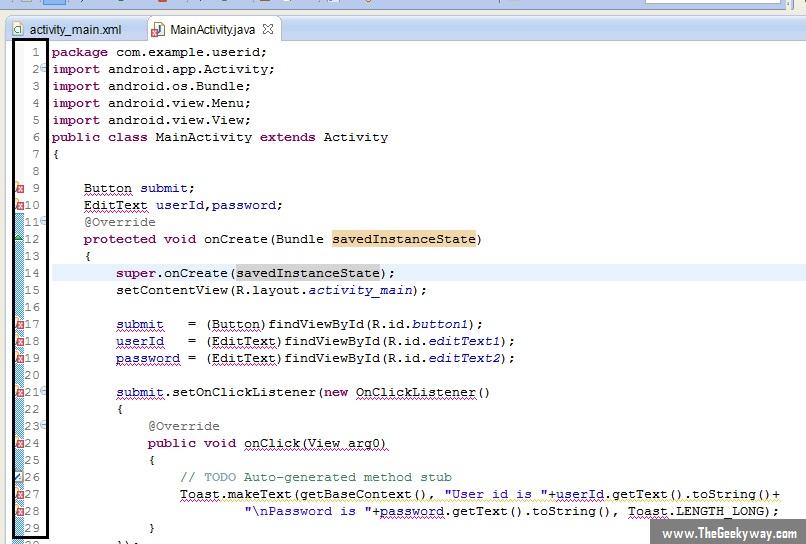
Welcome back geeks, so after pasting this code, you would be having the MainActivity.java file like this :

13

In this screenshot, notice the highlighted part on the left. The Eclipse IDE is showing some errors at some specific lines (line no. 9 10,17,18 and so on). Now we …


Continue reading

Second simple Android Application Part 2 (Android-Part 5)

Posted on Fri 14 February 2014 in Android • Tagged with Android

Welcome back geeks, this tutorial is a continuation of previous tutorial. So please read the previous one if you have not read it.

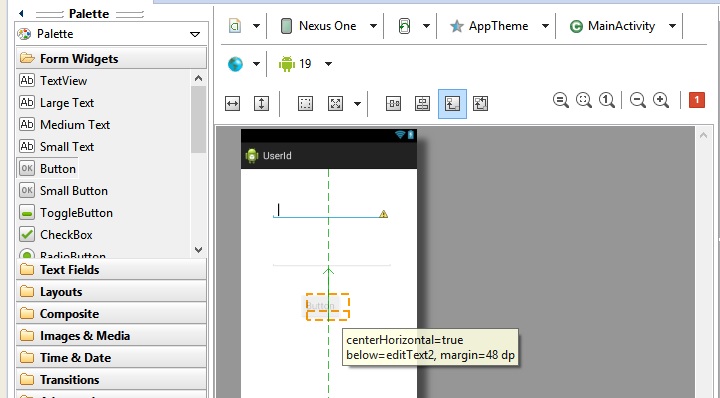
So we had created a simple layout and it looked something like this :

7

Double click on the button to change the text of the button, now the …


Continue reading

Second simple Android Application Part 1 (Android-Part 4)

Posted on Fri 14 February 2014 in Android • Tagged with Android

Hey Geeks ! Hope you all have gone through previous tutorials and are clear with the basics of android. Here we’ll create our second simple android application which will consist of creating our own layout and a bit of java coding. As discussed previously, the layout of our android application …


Continue reading